

The scale: lit keys are in it; press to add or remove that note (every octave)
Getting around
- turn SELECT
- Previous or next page (seven pages).
- turn KNOB 1-4
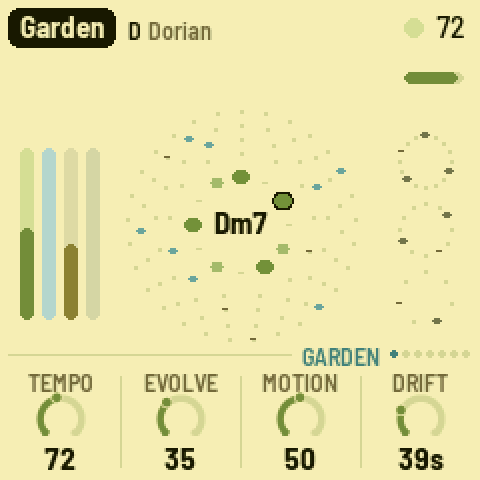
- The four values at the bottom of the screen.
- tap HOME
- Garden page: tempo, evolve, motion, drift.
Playing
- tap PLAY
- Grow or rest. Resting, the sound fades out slowly.
- F3 .. G5
- Any key: add that note to the scale, or take it out.
- turn ALGORITHM
- Mode: Ionian, Dorian ... pentatonic major and minor.
- tap EDIT
- Next chord, at the start of the next bar.
- tap REC
- Freeze: the chord holds, the reverb rings on. Again: thaw.
- tap OCT-
- Bells an octave down. OCT+ goes up (two each way).
- hold HOME+turn SELECT
- Set the tempo (30-120), from any page.
Sound
- tap ENV
- Pad: level, swell, bright, colour.
- tap ENV+turn KNOB 4
- Pad colour: Rhodes or sung voices.
- tap ARP
- Bells: level, density, tone, octave.
- tap LFO
- Bass: level, octave, glide, fifth.
- tap SEQ
- Pulse: level, hits, swing, hats. Hits at 0: no pulse.
- tap HOME+turn KNOB 2
- Evolve: how restless. At 0 the loops repeat exactly.
- tap HOME+turn KNOB 3
- Motion: how far the slow tide and the echo wander.
- tap HOME+turn KNOB 4
- Drift: how long a chord lasts, 20 s to 5 min.
Effects
- tap FX+turn KNOB 1
- Echo: how much goes to the tape echo.
- tap FX+turn KNOB 2
- Echo time: dotted quarter up to 4 bars.
- tap FX+turn KNOB 3
- Reverb: how much goes to the plate.
- tap FX+turn KNOB 4
- Size: room to long hall, and more echo repeats.
Saving & loading
- turn PRESETS
- Load another of the eight pieces, as you left it.
- tap SAVE
- Save all eight pieces now, even while playing.
- hold SAVE
- After 1.5 s: this piece back to its recipe (not saved yet).
Settings
- tap GLO+turn KNOB 1
- Root note of the key; the scale moves with it.
- tap GLO+turn KNOB 2
- Fine tune, plus or minus 50 cents.
- tap GLO+turn KNOB 3
- MIDI out on or off.
- tap GLO+turn KNOB 4
- Lights: On, Keys (key lights only) or Off.
Good to know
- Eight pieces, each its own key, tempo and sound: Garden, Departures, Voices, Afternoon, Night Bus, Shoreline, Glass, Tides.
- Hold any button (but PLAY) for a second: a card explains what it does.
- The root note always stays, and the scale keeps at least three notes.
- Editing the scale with the keys turns the mode into Custom; ALGORITHM loads a full mode again.
- It autosaves a few seconds after a change, but only while resting (PLAY off). A dot on screen means unsaved changes.
- While frozen (REC), EDIT's chord change waits until you thaw.
- Notes on MIDI channel 1 add or remove scale notes like the keys; MIDI clock sets the tempo (EXT).
- Hold OCT- and OCT+ for 5 seconds for update mode; let go early to cancel.
A community cheat sheet by the hub, not by the firmware's makers: when in doubt, their manual is right.