

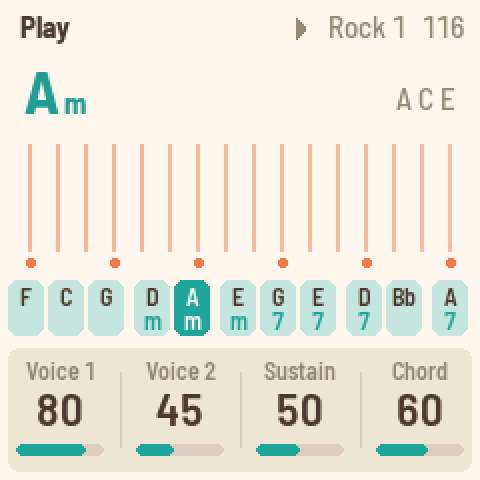
Strum plate: 16 strings of the chord, low to high (swipe to strum)Chord keys F C G | Dm Am Em | G7 E7 D7 | Bb A7 (hold ENV: minor, LFO: 7th)
Getting around
- tap HOME
- Play page: Voice 1, Voice 2, Sustain, Chord.
- tap SEQ
- Rhythm page: rhythm, tempo, drums, auto bass.
- tap FX
- Sound page: reverb, space, width, chord reverb.
- tap SEL
- Chords page: give any black key its own chord.
- tap GLO
- Setup page: tune, MIDI out, lights.
- tap EDIT
- Next page.
- turn KNOB 1-4
- The four values at the bottom of the screen.
Playing
- hold black key 1-11
- Play that chord with its bass: F C G, Dm Am Em, G7 E7 D7, Bb, A7.
- white key 1-16
- Pluck one string of the chord. Swipe across them to strum.
- hold ENV+black key 1-11
- That chord as minor.
- hold LFO+black key 1-11
- That chord as a 7th.
- hold ENV+hold LFO+black key 1-11
- That chord as a minor 7th.
- tap ARP
- Chord hold: the chord rings on. Same key again stops it.
- tap OCT-
- Strum plate an octave down. OCT+ goes up (one each way).
- turn PRESETS
- Transpose everything, -6 to +6 semitones.
Sound
- tap HOME+turn KNOB 1
- Voice 1: the shimmering harp.
- tap HOME+turn KNOB 2
- Voice 2: the plain harp. Mix the two.
- tap HOME+turn KNOB 3
- Sustain: how long the strings ring.
- tap HOME+turn KNOB 4
- Chord: level of the held chord and its bass.
- tap SEL+black key 1-11+turn KNOB 1
- New root note for that key.
- tap SEL+black key 1-11+turn KNOB 2
- Chord type: maj, m, 7, M7, m7, dim, aug, sus4, add9.
Sequencer / patterns
- tap PLAY
- Rhythm on or off.
- turn ALGORITHM
- Pick the rhythm: Rock 1, Rock 2, Disco ... Swing, Waltz.
- turn SELECT
- Tempo, 60 to 240.
- tap REC
- Sync start: after PLAY, the rhythm waits for your first chord.
- tap SEQ+turn KNOB 3
- Drums level.
- tap SEQ+turn KNOB 4
- Auto bass: with the rhythm on, chord and bass play in time.
Effects
- tap FX+turn KNOB 1
- Reverb: how much of the strings goes to the plate.
- tap FX+turn KNOB 2
- Space: the size of the plate reverb.
- tap FX+turn KNOB 3
- Width: how wide the stereo picture is.
- tap FX+turn KNOB 4
- Chord rev: reverb on chord and bass. Drums stay dry.
Settings
- tap GLO+turn KNOB 1
- Tune, plus or minus 50 cents.
- tap GLO+turn KNOB 2
- MIDI out on or off.
- tap GLO+turn KNOB 3
- Lights: On, Keys (key lights only) or Off.
- tap SAVE
- Save everything now.
Recovery
- hold OCT-+hold OCT+
- After 5 seconds: update mode. Let go early to cancel.
- hold OCT-+hold OCT++power on
- Calibrate the buttons and knobs.
- tap PLAY
- In SAFE MODE: try starting FoMni normally again.
Good to know
- First sound: hold black key 2 (C) and run a finger across the white keys.
- The strings keep the last chord, so you can let go of the black key and still strum.
- With the rhythm on and Auto bass on, a held chord is played by the rhythm, not as one long note.
- PRESETS transposes, and the chord names on screen move with it: set your key there.
- FoMni autosaves about 4 seconds after a change, once the rhythm is stopped and all is quiet. A dot in the header means unsaved changes.
- MIDI in: channel 1 notes pluck the nearest string, a chord on channel 2 becomes the chord, MIDI clock sets the tempo (EXT).
A community cheat sheet by the hub, not by the firmware's makers: when in doubt, their manual is right.