

Drums: kicksDrums: snare, clapDrums: hats, pedal hatDrums: rim, snare 2Drums: tomsDrums: crash, rideDrums: shaker, conga, cowbellDrums: same sound as white key to the left
Getting around
- tap HOME
- Back to the TRACKS screen.
- turn ALGORITHM
- Pick the track: 1-3 synths, 4 drums.
- turn SELECT
- Tempo on TRACKS; on other screens, the next page.
- tap LFO
- LFO pages; tap again for the next page.
- hold FX+tap HOME
- Lock a held layer open; any other button closes it.
- hold HOME
- Settings menu; OCT- closes it.
- tap HOME+tap HOME
- On TRACKS: full-screen visualiser; HOME again closes it.
Playing
- turn PRESETS
- Change the track's sound, or the drum kit on track 4.
- tap OCT-
- Octave down; both OCT buttons together: back to 0.
- hold OCT-+white key 1-16
- Drum track: ghost hit (OCT+: hard hit).
- hold SEL+white key 1-16
- Set the song's key for all synths.
- hold SEL+turn KNOB 1
- One-key chords: TRIAD, 7TH, 9TH, SUS4, POWER.
- hold ARP+white key 1-16
- Note repeat / drum roll; KNOB 1 sets its rate.
- tap ARP+turn KNOB 1
- Arpeggiator mode (OFF turns it off).
Sound
- turn KNOB 2
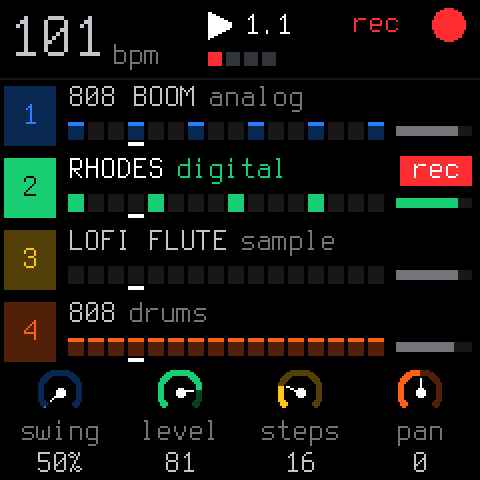
- On TRACKS: level of the selected track.
- turn KNOB 1
- On TRACKS: swing (KNOB 3 length, KNOB 4 pan).
- tap EDIT
- Synth track: the engine's sound pages.
- tap ENV
- Envelope: attack, decay, sustain, release on KNOB 1-4.
- hold GLO+turn KNOB 1
- Level of track 1 (KNOB 2-4: tracks 2-4).
Sequencer / patterns
- tap PLAY
- Start / stop all four tracks.
- tap REC
- Playing: record now, on top. Stopped: arm, first note starts.
- tap REC
- Empty song: play freely, REC on the next 1 closes the loop.
- hold REC
- Hold 2 seconds: clear the selected track.
- hold EDIT+tap OCT-
- Undo (OCT+: redo).
- hold SEQ+white key 1-16
- Set or clear steps 1-16.
- hold SEQ+turn KNOB 4
- Pattern length (KNOB 2 step size, KNOB 3 swing).
- hold EDIT+white key 1-16
- Erase that note or drum sound from the loop.
- hold GLO+white key 1-4
- Mute tracks 1-4 (keys 5-8: solo).
- hold GLO+white key 16
- Tap tempo.
Effects
- hold FX+white key 1-16
- Punch-in effect while held (loops, stutter, reverse...).
- hold FX+black key 1-11
- More punch-ins: kills, rewind, freeze, fade out...
- hold FX+turn KNOB 1
- Master DJ filter (KNOB 2 dust, KNOB 3 duck).
- hold FX+turn KNOB 4
- Filter of the selected track.
- tap FX
- Track sends: drive, chorus, delay, reverb.
Saving & loading
- hold SAVE+white key 5-8
- Save the loop as section A-D (used: press twice).
- hold SAVE+white key 1-4
- Play section A-D (on the next bar if playing).
- tap SAVE
- On TRACKS: song screen; elsewhere: presets and section pages.
Recovery
- hold OCT-+power on
- USB rescue mode: reinstall from the web installer.
- hold OCT-+hold OCT++power on
- Hardware calibration: teach each button and knob.
Good to know
- Keys play notes on tracks 1-3; on track 4 (drums) the white keys are 16 drum sounds.
- Every function button is a layer: hold it and the keys and knobs change job.
- Autosave: stop and leave it 2.5 s; it comes back as you left it at power-on.
- A short tap of FX, SEL, EDIT, GLO, ARP, SEQ or SAVE opens its pages instead.
- The REC screen (REC while stopped): KNOB 1 free / tempo, KNOB 2 bars, KNOB 3 count-in.
- Everything is played live: there are no factory patterns.
A community cheat sheet by the hub, not by the firmware's makers: when in doubt, their manual is right.