

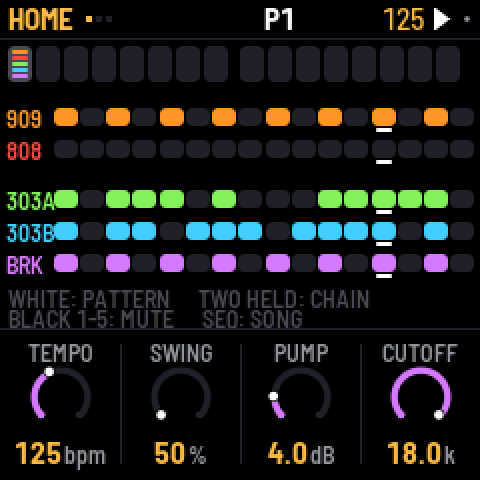
Steps 1-16 (OCT+ for 17-64); HOME: patternsDrum tracks BD SD LT MT HT RS CP CH OH CR RD; HOME: mute parts 1-5
Getting around
- turn ALGORITHM
- Pick the part: 909, 808, 303A, 303B or BREAK.
- tap EDIT
- The part's sound. Tap again for the next page.
- tap SEQ
- The part's steps: length, rate and more.
- tap HOME
- Patterns and mutes for all five parts. Tap again for the song.
- turn SELECT
- Previous or next page. In a list, moves up and down.
- tap SEL
- This screen as a list, including the extra settings.
- hold HOME+tap REC
- Undo. Use HOME + PLAY to redo.
Playing
- tap PLAY
- Start or stop.
- black key 1-11
- 909/808: pick a drum track (you hear it while stopped).
- white key 1-16
- Turn the selected track's step on or off.
- hold ENV+white key 1-16
- Accent that step.
- tap OCT+
- Next 16 steps (up to 64). OCT- goes back.
- hold HOME+black key 1-11
- 909/808: mute or unmute that drum track.
- tap REC
- Record drum hits and knob moves live. On a 303, the keys become a keyboard.
- hold black key 1-8
- BREAK: play that slice yourself.
- hold black key 9-11
- BREAK: reverse, half speed, stutter.
Sound
- turn KNOB 1-4
- Change the four values shown at the bottom of the screen.
- hold ENV+turn KNOB 1-4
- Set that knob back to its default.
- tap ARP+tap OCT+
- 303: TB-3PO writes a new line. OCT- mutates it.
- tap EDIT+turn KNOB 1
- 303: filter cutoff (KNOB 2 sets resonance).
- tap LFO
- Mixer: PARTS, 909 MIX, 808 MIX, MASTER (tap again for next).
- tap FX
- Reverb and delay. Tap again for the next page.
- hold white key 1-16+turn KNOB 1-4
- On EDIT: that step gets its own value (p-lock).
- hold white key 1-16+turn SELECT
- The chance that step plays.
Sequencer / patterns
- white key 1-16
- On HOME: pick a pattern for all five parts (at bar end).
- hold HOME+white key 1-16
- Pick a pattern from any screen.
- turn PRESETS
- Next pattern: this part only, or all five on HOME.
- black key 1-5
- On HOME: mute or unmute a whole part.
- hold HOME+turn SELECT
- Set the tempo.
- hold SAVE+white key 1-16
- Copy the current pattern onto that one.
- hold SAVE+tap REC
- Clear the selected part in this pattern (asks first).
- HOME twice+white key 1-16
- Song: put that pattern in the next bar.
Saving & loading
- tap SAVE
- Save everything. While playing, it saves when you stop.
- hold SAVE+turn KNOB 1-4
- Delete that knob's recorded motion.
- tap GLO
- Settings: autosave, clear pattern, factory reset, MIDI.
Recovery
- hold OCT-+hold OCT+
- After 5 seconds: update mode. Let go early to cancel.
- hold OCT-+hold OCT++power on
- Calibrate the buttons and knobs.
- tap PLAY
- In SAFE MODE: try starting X0X normally again.
Good to know
- Quick beat: black key 1 (kick), then white keys 1, 5, 9, 13, then PLAY.
- Hold any button for a second on its own: a card explains what it does here.
- With the pattern stopped, X0X autosaves 4 seconds after your last change.
- The factory mix pumps hard. For a clean mix, set COMP and PUMP to 0 on LFO > MASTER.
- While a pattern plays, picking a drum is silent so you don't add stray hits.
A community cheat sheet by the hub, not by the firmware's makers: when in doubt, their manual is right.