
The Firmware Hub · FM-1 · FiMba-1
FiMba-10.7.0 · beta

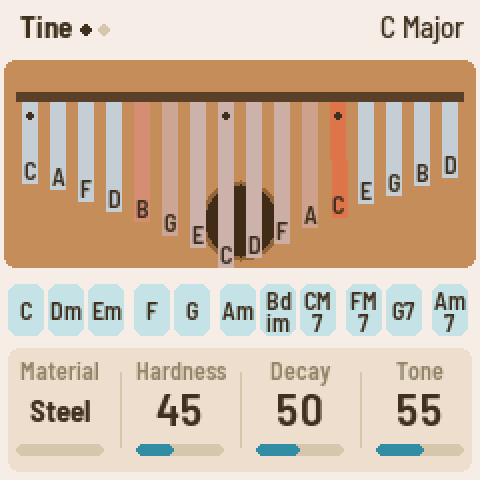
A physically modelled kalimba: tines laid out like the real one, thumb-roll chords, mbira patterns, a sound hole to cover, grains, tape and a plate reverb. Play it in the browser first.
Text by the hub. Your firmware? Write it yourself, in your repository.
About it
- Engines
- Physical modellingIts own: kalimba tines (physical model of metal/bamboo/glass bars + body)
- Runs on
- FM-1 · Browser ↗
- Release
- 0.7.0 · released 9 Nov 2026 · on the hub since 8 Oct 2026595 KB · what's new
- Licence
- GPL-3.0 · source ↗ · copy on the hub
- Flash chip
- Every FM-1, the newer chip
0xB36014too - Identity
FM-1_8000700what it reports over USB while it runs- Build
- Built by GitHub Actions from 838aa1d, signed
- Popular
- ↓ 345 installs via the hub · ★ 22 on GitHub
Ratings
Like FiMba-1



Changelog
What changed, version by version11 versions
0.7.0
- Works with the newer FM-1s: units sold since autumn 2026 (mostly on AliExpress) have a different flash chip, the UC25HQ80. FiMba-1 didn't know it, so on those units nothing was saved (NOT SAVED / FLASH ERROR) and new versions couldn't be installed from the web page. They now save and update like any other FM-1. Nothing changes on the older units.
- Screen reader: FiMba-1 tells the FM-1 Screen Reader what its screen shows, over USB: the page and its knobs, a knob's value as it turns, and what each button did. Open that page in Chrome with the FM-1 plugged in: it speaks with its own voice, or hands the text to your computer's screen reader. Nothing is sent unless the reader is listening.
- M-UPGRADE finds FiMba-1 again: M-VAVE's updater, from version 3.11, didn't recognise FiMba-1 ("A USB MIDI device is present but did not answer"), so you couldn't use it to go back to the stock firmware. It finds this version and later ones. To leave an older FiMba-1, use the web page's Back to the stock firmware.
- Back to the stock firmware takes V16: M-VAVE's download is now FM-1 V16, and the web page only took V15. It takes either now; the FM-1 accepts only the one its bootloader matches, so if one is refused, the page says to try the other (V15 is linked on the Internet Archive). The same button also takes an FM-1 back from M-VAVE's FM1 Open firmware.
- Built from source, and signed: the release's firmware is built on GitHub by the shared FM-1 builder, which signs a record of where it came from, for the release's tag. That's what The Firmware Hub looks for to show a firmware as built from source, and anyone can check a downloaded package (
gh attestation verify, in the release notes). - The web app with a keyboard or a screen reader: every knob, button and key can be reached with Tab; arrow keys turn a knob, Space or Enter holds a button or key, Shift+Enter keeps a button down. The app speaks its screen as the FM-1 does, through your screen reader or its own voice (Speak the screen), and a lit button says so. The single-key shortcuts only work while the panel has focus, and can be turned off. There's a Mute button, and the text has more contrast.
- The web app on a phone: at phone width the panel keeps its controls big enough to press, and scrolls sideways in its own box.
0.6.1
- Less work with Reverb at 0: once the reverb's tail has died away, the reverb stops running until you turn it up again (on the FM-1, about 24% → 15% CPU when nothing is playing). Nothing changes in the sound.
0.6.0
- Reset to the defaults: hold SAVE for 1.5 s, then press SAVE again to confirm (anything else, or waiting 5 s, keeps everything). Every sound setting goes back to its default; the Setup page (Tune, MIDI, Theme) stays as it is.
- MIDI out is off by default. Turn it on on the Setup page (GLO, KNOB 3). Settings you've already saved keep what they had.
- Wah needs a sound hole: on the Board and None bodies, Wah and Wah rate are greyed out and don't turn ("NO HOLE: BOX OR GOURD").
- The middle of the kalimba glows: the key under the lowest tine (white key 9 in Tine, 8 in Mirror; in Keyboard, the key that plays middle C) is dimly lit, and lights fully while it rings.
0.5.2
- Wah is how much wah. With Wah rate on, the hand now flutters from open to the Wah setting and back, so Wah 100 is the full sweep and low settings a gentle one. In 0.5.1 it was the other way round: the flutter filled what Wah left open, so Wah 1 swept the whole way and Wah 100 didn't move.
- The fastest Wah rates (up to ~8 Hz) now sweep fully instead of being smoothed away.
0.5.1
- The wah is now heard. Covering the sound hole (ENV → Body: Wah, the mod wheel, pressure, the Hole key, or Wah rate) muffles the sound like a vowel closing: bright with the hole open, dark and a little quieter covered, with a vowel-like peak sweeping through the tines on the way. Before, it only moved a resonance below the lowest tine, and barely changed the sound. Box and Gourd have a hole; Board and None don't.
- The hand glides over the hole in about 20 ms, so the Hole key covers and uncovers it without a click.
- Wah rate's lowest setting reads Off (it was "Hand"): the hole moves only when you move it.
0.5.0
- Theme, a new knob on the Setup page (GLO, KNOB 4): Light, the pale wood and dark ink as before, or Dark, near-black with cream and amber. In Dark the knob bars and the chips turn cream and brown, so amber only means a tine sounding or a knob touched. The tines keep their metal in both. The screen changes at once, and the theme is saved with your settings.
- The Setup page's header shows the firmware's version, beside the CPU load.
- Saved settings carry over; Theme starts on Light.
0.4.1
- Tine is now left-first, as on a 17-key kalimba in C. C4 sits on white key 9, the next note up (D4) is on its left, and the scale alternates outward: D6 on the far left, C6 on the far right (#1).
- Mirror, a new Layout value (Keys page, KNOB 1), keeps the old right-first arrangement: C4 on key 8, D4 on its right.
- Saved settings carry over. A project saved on Tine plays the new way; pick Mirror for the old one.
0.4.0
- 16 voices (up from 12): fewer tines cut short when long-ringing steel tines and patterns overlap. Upper overtones that have died away are skipped, so ordinary playing costs less.
- Worn: an old, played-in kalimba. Each tine gets its own quirks: a little out of tune (up to ±12 cents), a longer or shorter sustain, a faster or slower beat, uneven brightness and level.
- Pages by button: each page button owns its pages; press it again for the next (dots in the header show which). HOME: Tine → Character (Worn, Glide, Tuning, Release). ENV: Body. FX: Space → Color. LFO: Grain → Spread. SEL: Keys → Play. SEQ: Pattern. GLO: Setup.
- ARP: tap to start or stop the pattern; hold to open its settings.
- Settings saved by earlier versions carry over; new settings start at their defaults.
0.3.0
- The web page installs FiMba-1 on the FM-1 over USB, and offers the highest release.
- It runs on the FM-1: the first install on real hardware boots and plays.
0.2.0
- CI builds the firmware package and checks it against FoMni's; a version tag makes a release.
0.1.0
- The first release.